
The Best Study Tools for College Students to Learn Smarter
Feb 7, 2026

Let's be real: staring at a mountain of lecture notes, random PDFs, and bookmarked YouTube vids is a total vibe killer. If your study system feels more like digital chaos than an actual plan, you're in the right place. The old-school ways of studying just don't hit different when your course materials are scattered across five different platforms.
This isn't just another list of apps you'll download and forget. It's a legit guide to actually conquering your coursework without pulling all-nighters. We're diving into the tools that are genuinely changing the game, from AI-powered hubs that automate your study guides to simple apps that just get your life organized. Think of it as building your own personalized study 'stack' that finally clicks with how you learn.
Your College Study Game Is About to Level Up
The shift to digital and hybrid classes has completely rewritten the rules. It's not just you—recent research shows a massive 81% of college students have changed how they learn since the pandemic began. We're all searching for better methods, and it's working: 65.1% of students now use planners or digital calendars to structure their routines and get back in control. You can see more on these trends in the full student habits report.
This tells us one thing loud and clear: success isn't about working harder anymore. It's about building a smarter system.
The goal is to stop hunting for scattered files and start transforming them into a powerful, centralized study engine. Everything you need, all in one place, ready when you are.
Your Modern Student Toolkit at a Glance
So, what does a modern toolkit actually look like? It’s less about having a folder crammed with dozens of apps and more about choosing a few powerful tools that vibe together. We'll get into the details of each category, but here’s a quick snapshot of the essentials.
The table below breaks down the core types of tools every student should consider. Think of it as your cheat sheet for solving the most common study headaches.
Tool Category | What It Solves | Best For |
|---|---|---|
AI Study Hubs (like Vivora) | Puts all your materials (notes, vids, PDFs) in one place and auto-generates study guides. | Organizing entire courses, exam prep, and catching up fast. |
Digital Note-Taking Apps | Capturing and organizing lecture notes and ideas. | In-class notes, brainstorming, and digital whiteboarding. |
Flashcard and Quiz Makers | Memorization and active recall practice. | Mastering key terms, formulas, and concepts for exams. |
Organization and Task Managers | Managing deadlines, assignments, and study schedules. | Time management and not missing a single due date. |
By the time you finish this guide, you’ll have a clear plan to organize your semester, master those tough subjects, and finally get some of your free time back. Now, let's dive into the essential tool categories that top students are using to stay ahead.
Finding the Right Tools for Your Study Style
Let's get one thing straight: not all study tools are created equal. The app that works wonders for your roommate might be totally useless for you. That's because effective studying isn't about downloading the most popular software; it's about building a system that actually fits your unique study style.
Are you the classic "Exam Crammer," trying to absorb an entire semester's worth of content the week before finals? Or maybe you're the "Online Learner," juggling pre-recorded lectures, PDFs, and discussion boards for multiple classes. Who you are as a student dictates the kind of support you really need.
This quick decision tree can help you figure out where to start.
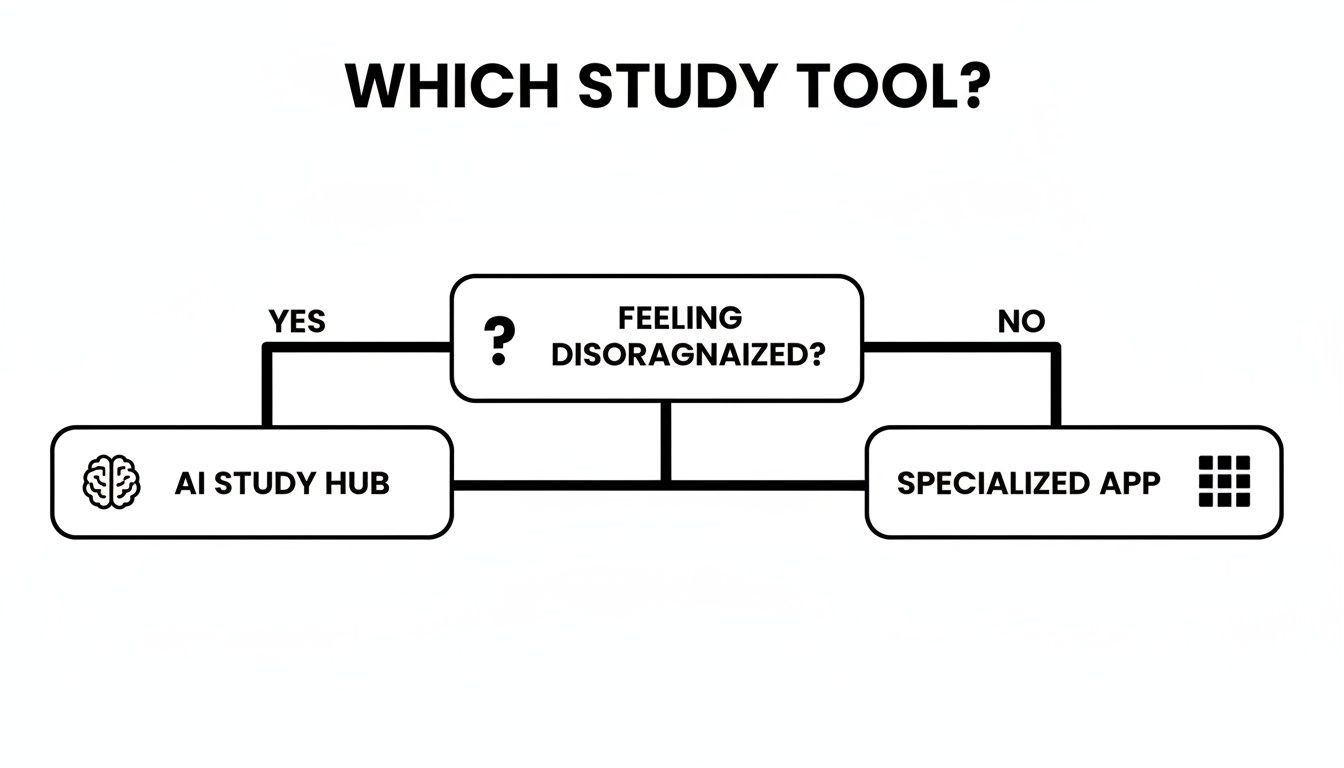
The flowchart highlights a simple but powerful truth: if your biggest struggle is just trying to wrangle scattered materials from a dozen different places, an all-in-one AI hub is your best bet for getting everything under control.
Matching Tools to Your Student Persona
To find your perfect fit, you first have to get real about your own study habits. Most of us fall into one of a few common profiles, each with its own set of challenges and ideal tools.
The Exam Crammer: Your mission is to process a massive amount of info, and fast. The biggest hurdle is turning weeks of lectures and readings into digestible review material without getting totally overwhelmed. An AI study hub is your secret weapon here. For instance, a tool like Vivora can take a folder of lecture recordings, slides, and notes and instantly generate a consolidated study guide, practice quizzes, and flashcards. This automates the most time-sucking part of cramming—organizing—so you can spend more time on what actually matters: active recall.
The Consistent Organizer: You're the type who likes to stay on top of your work week by week. Your main goal is to keep materials tidy and review concepts regularly so nothing piles up. You might pair a digital note-taking app for in-class use with a simple flashcard maker for weekly reviews. For you, the key is consistency and having a dedicated place for everything.
The real game-changer is moving beyond just downloading apps. It's about creating a strategic system where your tools work together to make studying less stressful and way more effective.
Building a Strategic Study Stack
Instead of just collecting a random assortment of apps, think about building a "study stack"—a small, hand-picked set of tools that handle different parts of your workflow. A great stack doesn't need ten different programs; it just needs the right ones.
For instance, a visual learner in a history class might put together a stack like this:
Mind-Mapping Tool: To visually connect key dates, figures, and events during lectures.
AI Study Hub (Vivora): To upload those mind maps alongside textbook PDFs and documentary links, creating a single source of truth for the entire course.
Flashcard App: To drill key terms and dates while waiting for the bus or grabbing coffee. You can find out more about how to use digital flashcards for effective learning to seriously boost memory retention.
This approach creates a seamless flow, from learning new info in class to reviewing it for the final exam. By figuring out your persona and building a smart, simple stack, you stop fighting against your own study habits and start making them work for you.
How AI Study Hubs Actually Change Your Workflow
So you've heard the hype about AI, but how does it actually change the way you study? Let's get practical. AI-powered study platforms are more than just fancy note-takers; they’re smart systems designed to act like a personal tutor who’s available 24/7.
Think of your usual study process. It’s a bit like trying to build a LEGO set from a giant, disorganized pile of bricks. You have to hunt down everything yourself—your lecture notes, the required readings, random YouTube vids—and then try to figure out how it all fits together. It's slow, frustrating, and you're never quite sure if you've missed something important.
An AI study tool like Vivora is the master builder who does all the heavy lifting for you. You just hand over the bricks—your course materials—and it assembles the set, gives you the instructions, and even points out the most important parts. This is what makes it one of the most practical study tools for college students: it automates the most tedious part of learning.
From Chaos to Clarity
The real magic of an AI study hub is its ability to understand and connect info across totally different formats. Your professor’s monotone lecture recording, a dense 30-page PDF, and a PowerPoint deck might all cover the same core concepts, just in different ways.
Instead of you having to re-read and re-watch everything to find those connections, the AI scans it all in minutes. It pinpoints the most important ideas and pulls them together into a single, cohesive study guide.
This means you can spend less time organizing and more time actually learning. For instance, Vivora can instantly generate a set of flashcards based on the key vocab from a textbook chapter and the definitions your professor mentioned in a lecture. That's hours of manual work, done in seconds.
Building Trust in the AI
Of course, it’s smart to be a little skeptical. With all the buzz around AI, accuracy is a huge concern. A recent global survey found that while 40% of college students are using GenAI for school, nearly half of them worry about getting bad information. In fact, 55% of all students said human expertise and oversight was their top priority for study support. You can read the full student survey results to see more on this.
This is where the best tools prove their worth. They aren't just spitting out random text from the internet.
The best AI study hubs are designed to work with your course materials, not replace them. They act as a synthesizer for information you already trust—content from your own professors and required readings.
This creates a reliable feedback loop. The AI organizes and clarifies the content, but the source material is always your own. You can quickly cross-reference any generated notes with your original files, making sure everything is accurate and building real confidence in the tools you’re using. It’s all the time-saving benefits, without the academic risk.
Building Your Ultimate Study Routine with Vivora
Alright, theory is great, but let's talk about what actually works—the stuff that saves you time and stress. Having a bunch of cool study tools is one thing; knowing how to weave them into a killer routine is the real game-changer.
We're going to walk through a step-by-step workflow that uses an AI-powered hub like Vivora to anchor your entire study process. The goal? To turn that mountain of chaotic files and scattered notes into an engine that helps you learn smarter.
Forget spending the first hour of a study sesh just trying to track everything down. A modern workflow starts with one simple idea: put it all in one place. Your sanity will thank you.
Step 1: Centralize Absolutely Everything
First things first, stop treating your study materials like they live on different planets. Your professor's lecture slides, that required YouTube documentary, and your own hastily typed notes all belong together. You need to create a single source of truth for each class.
Instead of a folder for PDFs here, a video playlist there, and a separate doc for notes, you're going to bring it all into one central hub.
Upload Lecture Slides: Drag and drop those PowerPoint or PDF files directly into your course space in Vivora.
Add Video Links: Grab the URL from that required YouTube clip and toss it in.
Include Your Notes: Upload the notes you took in class or while reading the textbook.
This initial dump might feel like you're just moving the mess around, but it's the critical first step. You're giving Vivora all the raw ingredients it needs to work its magic.
Step 2: Let the AI Do the Heavy Lifting
This is where you get to sit back for a minute and watch the chaos turn into clarity. Once your materials are uploaded, a platform like Vivora automatically gets to work scanning, analyzing, and connecting the dots between all those different files. It's like having a personal TA who's a speed-reading genius.
Within minutes, Vivora processes everything and generates a unified set of study tools based on the most important concepts from all your combined materials.
This isn't just about converting a file from one format to another. It's about synthesis. The AI identifies overlapping themes between a lecture slide and a video, creating a study guide that's more complete than any single source on its own.
The process takes your scattered course content and transforms it into an organized, actionable study hub.
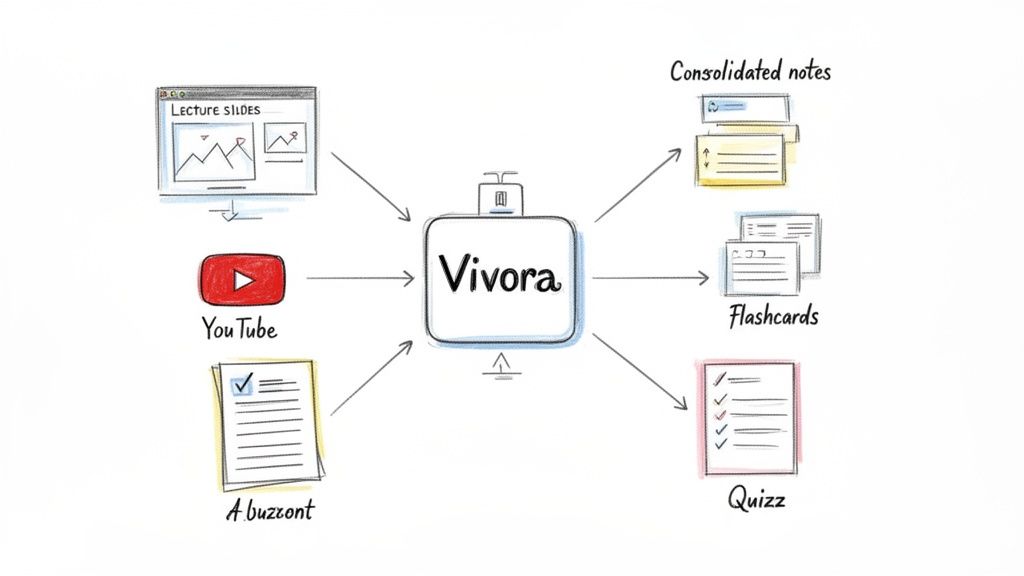
As you can see, the platform automatically generates organized notes, flashcards, and quizzes, which can save you hours of manual prep work.
Step 3: Study Smarter, Not Harder
Now that Vivora has built your personalized study guide, your review process becomes targeted and efficient. Instead of passively re-reading a textbook chapter for the third time, you can jump into active recall—a method proven to lock information into your long-term memory far more effectively.
Your new, smarter study session could look something like this:
Targeted Review: Start by scanning the AI-generated summary notes. This gives you a high-level overview of the key topics and refreshes your memory on what the AI identified as most important.
On-the-Go Flashcards: Use the digital flashcards on your phone while you're on the bus, in line for coffee, or have a spare 10 minutes between classes. It's perfect for drilling key terms and formulas.
Find Your Weak Spots: Take the auto-generated practice quizzes. The goal here isn't to get a perfect score; it's to quickly figure out what you don't know. This data is gold because it tells you exactly where to focus your remaining study time.
This method flips the old way of studying on its head. You end up spending less time on material you already know and doubling down on the concepts that are actually tripping you up.
Step 4: Get Instant Answers When You're Stuck
We've all been there. It's 11 PM, you're stuck on one confusing concept, and your professor's office hours were yesterday. This is where having an integrated AI chat becomes your best friend.
Instead of endlessly Googling and hoping you land on a reliable answer, you can ask specific questions directly within Vivora, which knows your course materials inside and out. For example, you could ask:
"Can you explain the difference between mitosis and meiosis using the info from my lecture slides?"
"Summarize the main argument from the YouTube video on globalization."
"Create a simple analogy for the concept of 'supply and demand' based on my textbook PDF."
This repeatable process—centralize, generate, study, and clarify—creates a powerful feedback loop. It's a system you can apply to every class, every semester, turning you into a more organized and efficient student.
Creating Study Schedules That Actually Work
Having the best study tools is a lot like having a pro-level camera—it’s powerful, but it won’t take great photos on its own. You still need a plan. A killer set of tools is only half the battle; you also need a schedule that actually fits your life. This is where you turn your shiny new study stack into a real strategy for acing your classes.
Forget those rigid, one-size-fits-all planners that you abandon by week two. A truly effective schedule needs to be flexible. It has to breathe with the rhythm of the semester, adapting from those early, chill weeks to the full-blown chaos of finals.
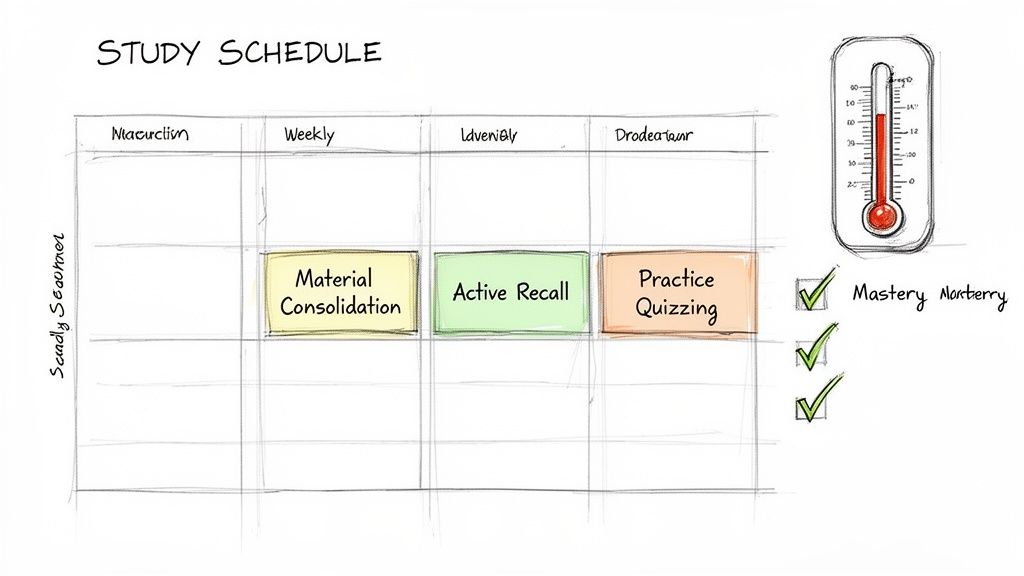
Let’s walk through a few templates you can steal and make your own. I’ll show you exactly how to plug in specific tool-based actions to make every study session count.
Your Template For Midterm Mayhem
When midterms start popping up, your study approach needs to shift from a casual jog to an all-out sprint. This isn't about cramming or pulling all-nighters—we all know that's a trap. It’s about being ruthlessly strategic with your time. The "Midterm Mayhem" plan is all about consolidating info fast and then drilling it until it becomes second nature.
Here’s a look at what a focused week of prep could look like, weaving in tools every step of the way.
Sample Midterm Mayhem Weekly Study Plan
This one-week intensive schedule is designed to get you from overwhelmed to prepared for a major exam. It builds from organizing your materials to actively testing your knowledge.
Time Slot | Monday | Tuesday | Wednesday | Thursday | Friday |
|---|---|---|---|---|---|
Morning (9-11 AM) | Consolidate all notes/slides for Ch. 1-3 into Vivora. | Review Vivora summary notes for Ch. 1-3. Pinpoint weak spots. | Active recall session using Vivora flashcards for Ch. 1-3. | Review summary notes for Ch. 4-6. | Full practice exam quiz in Vivora. |
Afternoon (1-4 PM) | Generate & take initial quiz on Ch. 1-3 content. | Deep dive into weak spots. Use AI chat to clarify concepts. | Consolidate all notes/slides for Ch. 4-6 into Vivora. | Active recall session using Vivora flashcards for Ch. 4-6. | Review incorrect answers. Final Q&A with AI chat. |
Evening (7-9 PM) | Light review of flashcards. | Watch supplemental videos on tough topics. | Light review of flashcards for all chapters. | Take practice quiz on Ch. 4-6. | Relax & recharge! |
Notice the flow here? It’s not random. The week progresses from organizing your content to actively testing what you know. This lets you find and fix your knowledge gaps long before you walk into the exam room.
Tracking Progress To Study Smarter
So, how do you know if any of this is actually working? Going with your gut isn't going to cut it. You need to measure your progress so you can focus your limited time where it will have the biggest impact.
This is where the data from your study tools becomes your secret weapon. Those quiz scores aren't just numbers—they're a roadmap showing you exactly what to study next.
Think of your study tool's analytics like a video game skill tree. It shows you which abilities (or concepts) you’ve mastered and which ones still need more XP. This lets you allocate your energy to leveling up the right skills before the final boss battle (aka the exam).
For example, if you take a practice quiz in Vivora and consistently bomb questions about a specific topic, that's your cue. Don't waste another minute re-reading the chapters you're already acing. Instead, dedicate your next study block to a deep dive on that one tricky concept, maybe using the AI chat to get simpler explanations or find real-world examples.
The Balanced Week And Finals Countdown
Beyond midterms, you can adapt this same core logic for every other phase of the semester.
The Balanced Week Schedule: This is your plan for normal, non-exam weeks. Just dedicate 30-60 minutes a day for each core class. Use this time for "Material Consolidation"—basically, uploading that day's lecture notes and slides into your AI hub. This small, consistent habit prevents a massive, stressful pile-up later on.
The Finals Countdown Schedule: Two weeks before finals, your schedule should look a lot like the Midterm Mayhem plan, just scaled up. Morning blocks are for reviewing consolidated summaries, afternoons are for intense practice quizzing across all chapters, and evenings are for targeted review of your weakest areas identified by your quiz data.
By matching your schedule to the demands of the semester and letting data guide your focus, you stop studying hard and start studying smart. This is how you turn your effort into what really matters: better grades and way less stress.
Got Questions About Study Tools? We've Got Answers.
Jumping into a new set of study tools can feel like a big commitment, and it's smart to ask some tough questions before you dive in. Let's get straight to the real answers for the questions we hear all the time.
Are AI Study Tools Considered Cheating?
This is a big one, and the answer really boils down to how you're using the tool. It is not cheating to use AI to help you learn more effectively. It absolutely is cheating if you use it to do the work for you.
Think of it this way: using a tool like Vivora to organize your own notes, generate flashcards from your professor's slides, or create practice quizzes is a powerful—and totally ethical—way to study. That's you, putting in the effort to learn. The line gets crossed when you ask an AI to, say, write an essay for you from scratch.
You should always check your school's academic integrity policy, but the best way to frame these tools is as your personal AI tutor, not an academic shortcut.
How Many Study Apps Should I Actually Use?
It's so easy to fall into the "app overload" trap. The goal isn't to collect the most apps; it's to find the right ones that work together without adding more chaos. The best approach is to build a simple, powerful "study stack."
A minimalist stack is always more effective. Start with a central hub where everything lives, then add only one or two specialized tools if you absolutely need them. For most students, a core of 2-3 integrated tools is far more powerful than trying to juggle ten.
A perfect stack might just be Vivora as the central hub for all your course content, paired with a good calendar app for deadlines. That's it. You can learn more about finding the right tools by checking out our full guide on study tool FAQs.
Will These Tools Work with Different Types of Materials?
Yes, and that's exactly the problem modern study tools were built to solve. Old-school studying made it a nightmare to connect a PDF textbook chapter with a YouTube lecture and your professor's audio recording. Everything was disconnected.
Platforms like Vivora are designed for this multi-format reality. You can upload all those different files and links, and the AI gets to work processing them into a single, cohesive study guide. It breaks down the walls between your learning materials so you can finally see the big picture.
How Do I Start a New Tool Without Getting Overwhelmed?
The key is to go for a small, immediate win. Don't try to upload your entire semester's worth of content on day one. That's a recipe for burnout.
Instead, try this simple process:
Pick one class—ideally, one you find challenging.
Gather the materials for just the most recent lecture. Think the slide deck, your personal notes, and maybe one relevant reading.
Upload just those 2-3 items into Vivora.
Spend 15 minutes looking over the auto-generated notes and trying out the flashcards.
This quick test will show you the value right away. It gives you that "aha!" moment and the confidence to start organizing your other courses without feeling like you have to climb a mountain all at once.
Ready to stop juggling scattered notes and start studying smarter? Vivora transforms your messy course materials into clear, personalized study guides automatically. Get your free trial and build your first study guide in minutes.