The Best Note Taking Software For Students
Feb 21, 2026
Staring at a mountain of lecture slides, random PDFs, and a dozen YouTube links for just one class? Yeah, we’ve all been there. The best note-taking software for students isn’t just another app; it’s your command center for your brain. It takes all that scattered content and turns it into a powerful, searchable, and organized study hub.
Think of it as the difference between a messy garage and a perfectly organized workshop—one creates stress, the other empowers you to build something great.
Your Semester Is Chaos. We Can Fix That.
Let's be real—that old-school method of cramming notes into a three-ring binder just doesn’t cut it anymore. Between online course portals, email attachments, and random links your professor drops in the group chat, just keeping track of everything feels like a full-time job.
This is your intervention. It’s time to stop drowning in digital clutter and start building a system that actually works for you, not against you. Digital note-taking isn't just some trend; it's a survival strategy for modern students. Forget about messy handwriting, lost papers, and that sinking feeling when you can't find that one crucial diagram the night before an exam.
The Big Problem With Old-School Notes
There’s a reason everyone is ditching paper. Relying on physical notebooks creates so much unnecessary friction in your study process. What happens when you need to find a specific concept from a lecture three weeks ago? You’re stuck flipping through hundreds of pages, wasting precious time you should be using to actually learn.
A dedicated digital workspace changes the entire game. It’s not just about typing your notes. It’s about creating a single source of truth where every single piece of learning material—from lecture recordings to your own thoughts—lives together in perfect harmony.
The core idea is simple: spend less time managing your materials and more time mastering them. An organized digital system gives you the headspace to focus on what really matters—understanding the content and acing your exams.
This shift isn't just a personal preference; it's a massive global movement. The note-taking app market is projected to skyrocket from $10.8 billion in 2026 to an insane $37.4 billion by 2034. That growth is being driven by students just like you.
In fact, a whopping 70% of undergrads now prefer digital notes specifically for their search and collaboration features, which saves them an estimated 30-50% of the time they used to spend just on organization. You can get more details on this growth from this in-depth research on note-taking apps.
A quick look at the old way versus the new way makes it obvious why the change is happening so fast.
Why Your Old Note-Taking Method Is Failing You
Feature | Paper Notes (The Old Way) | Digital Notes (The Smart Way) |
|---|---|---|
Searchability | Non-existent. Good luck finding anything. | Instant. Find any keyword in seconds. |
Organization | Limited to binders and tabs. Easily lost. | Flexible folders, tags, and links. |
Accessibility | Stuck in one notebook. | Synced across all your devices. |
Media | Text and maybe a sad drawing. | Embed videos, audio, images, and links. |
Backups | One coffee spill and it's gone forever. | Automatic cloud backups. Phew. |
Collaboration | Photocopying pages. (Remember that?) | Share and edit notes with classmates easily. |
See the difference? It’s not even a fair fight.
This is exactly where an AI-powered study tool like Vivora comes in. It’s designed to be your academic command center. You can dump all your class content—slides, PDFs, even video links—into one place, and it automatically organizes it into a clear, personalized study guide.
No more hunting for files or trying to decipher your own scribbles from two months ago. Vivora does the heavy lifting, so you can just focus on learning.
Finding The Features That Actually Matter
Jumping into the app store for a note-taking tool can feel like scrolling endlessly through Netflix—tons of options, but no clue what's actually good. You see a dozen apps that all seem to do the same thing, and it's nearly impossible to tell which ones can handle the chaos of a student's life. Let's cut through the marketing fluff and figure out what you really need.
Here’s the thing: not all features are created equal. Some are just flashy distractions, while others are absolute game-changers for your GPA. The trick is to know the difference between the must-haves and the nice-to-haves, based on how you actually study.
The modern student's biggest challenge is wrestling with a constant stream of disorganized materials. You've got lecture slides coming from one direction, dense PDF readings from another, and a dozen random web links a professor mentioned in class. It’s a tangled mess you’re somehow supposed to turn into actual knowledge.
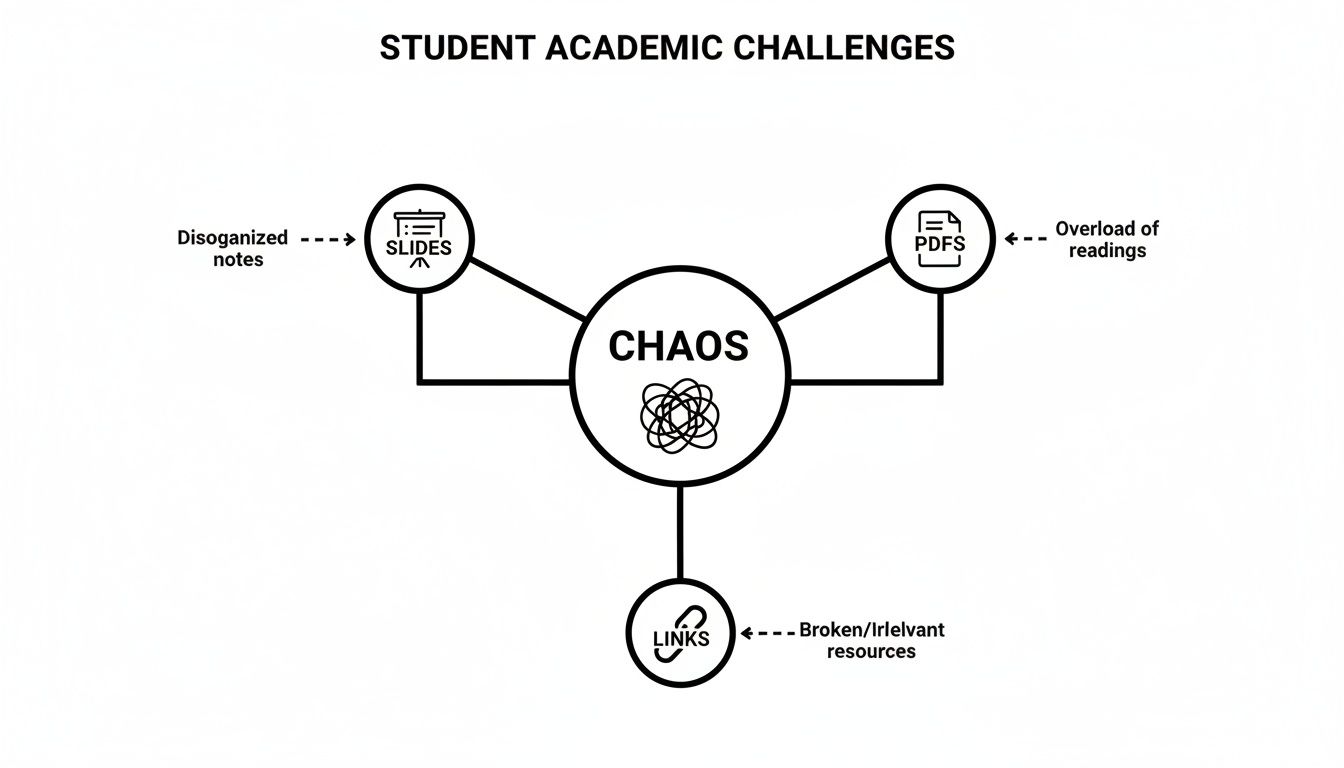
This diagram perfectly captures that feeling of academic chaos. When your resources are scattered, studying feels inefficient and completely overwhelming. The right software is supposed to bring order to this mess, acting as one central hub for everything.
Core Features Every Student Needs
Think of these as the non-negotiables. If an app doesn't nail these basics, it’s not going to survive a single semester. These are the foundational tools that stop your digital life from completely falling apart.
Cloud Sync Across Devices: Your notes have to be everywhere you are—on your laptop in class, on your phone while you're on the bus, and on your tablet for a late-night study session. Automatic syncing is your safety net.
Solid Organization Tools: This is more than just a single, endless list of notes. You need folders (or notebooks) for each class, tags to categorize topics like #midterm or #key-concept, and a search function powerful enough to find what you need, instantly.
Rich Text Formatting: You should be able to make your notes look the way you think. That means essentials like headings, bold and italic text, bullet points, and checklists to keep your thoughts structured and easy to scan.
Support for Different Media: Your classes aren't just text. You need an app that can handle PDFs, images, and links without breaking a sweat. Being able to drop a screenshot of a graph right next to your explanation is a must.
These features are the backbone of any good note taking software for students. They make sure your notes are organized, accessible, and actually helpful when it's time to study. But the basics are just the starting line.
Next-Level Features That Save You Time
Okay, this is where things get interesting. Core features help you store information, but the next-level stuff helps you understand it. This is what genuinely makes studying easier and faster.
The biggest leap forward isn't just about taking better notes; it's about making your notes work for you. The goal is to automate the boring, repetitive parts of studying so you can focus on actual learning.
This is where AI-powered tools like Vivora are changing the entire game. Instead of just giving you a blank page, it actively transforms your class content into a personalized study guide.
Here are the features that make a real difference:
AI-Generated Summaries: Imagine uploading a 40-page chapter and getting the main points in a few paragraphs. This is a lifesaver for dense readings or catching up on a lecture you might have zoned out of.
Automatic Flashcard and Quiz Creation: Making flashcards by hand takes forever. A smart tool can scan your notes, pull out key terms and concepts, and instantly generate study sets and practice quizzes for you.
Built-in Media Integration: This goes beyond just attaching a file. An AI tool like Vivora lets you drop in a YouTube or TikTok link and pulls the content right into your study guide, often with a full transcript and summary. Finally, all your video resources can live with your text-based notes.
AI Chatbot for Your Course: Stuck on a concept from your own notes at 2 AM? An AI chatbot that’s trained only on your class materials can give you instant, accurate answers without you having to scrub through hours of lectures.
These advanced tools don't just organize your chaos; they transform it into personalized study guides. They're built to solve the real pain points of being a student, saving you precious time and helping you learn more effectively.
How AI Is Revolutionizing Your Study Routine
Let's talk about the ultimate study hack. It’s not some far-off sci-fi concept anymore—it’s the new secret weapon for students who want to get ahead. Artificial intelligence is completely changing the game by automating the most mind-numbing parts of studying, freeing you up to actually learn.
Picture this: you just survived a two-hour chemistry lecture. Instead of spending another hour re-listening to the recording while frantically typing notes, you just upload the audio file. Seconds later, you have a clean, concise summary of every key concept. That’s not the future; that’s what's happening right now.
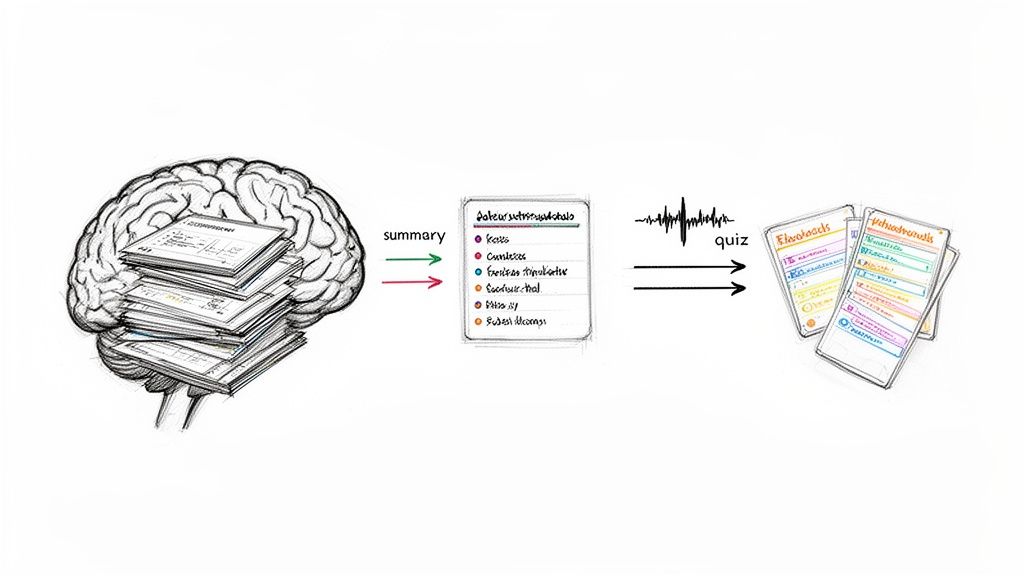
This is a perfect example of turning passive reading into an active study session, all without the hours of manual grunt work. An AI-powered tool can take a dense textbook chapter and instantly break it down into summaries you can actually use and flashcards you can quiz yourself with.
From A Dumb Box To A Smart Assistant
Most standard note-taking apps are basically empty digital notebooks. They’re a blank space where you still have to do all the heavy lifting—the typing, the organizing, the searching. Sure, it beats pen and paper, but it’s still an incredibly manual process.
An AI-powered study tool is a whole different beast. Think of it less like a notebook and more like a personal teaching assistant.
A standard note app is a library where you have to find and organize all the books yourself. An AI-powered tool is your personal librarian who finds the exact info you need, highlights the important parts, and then quizzes you on it.
This shift—from a passive container to an active assistant—is what makes AI so powerful. It’s not about replacing your brain; it’s about giving it a super-efficient sidekick to handle the busywork. You can finally study smarter, not just harder.
And students are catching on fast. The global market for AI note-taking is projected to grow from $623.50 million in 2025 to a massive $3,476.74 million by 2035. For the 40% of US undergrads taking online courses, AI tools can slash study time by up to 40%. It’s a huge productivity boost that 60% of students are calling a major benefit.
The AI Features That Change Everything
So, what does this "AI magic" actually look like in practice? It's not just one thing. It's a suite of smart tools designed to attack the biggest time-sucks in your study routine. Here’s what you should be looking for.
Auto-Transcription and Summaries: This is the big one. Upload any lecture audio, video link, or even a picture of your textbook page. The AI transcribes it, figures out what’s most important, and gives you a clean summary. It’s like having an expert TA who takes perfect notes for you.
Instant Quizzes and Flashcards: This feature alone can save you dozens of hours each semester. Instead of manually creating study materials, the AI scans your notes and readings to generate practice questions and flashcards. It makes active recall—a scientifically proven way to boost your memory—completely effortless.
Context-Aware AI Chat: Got a specific question about a concept from your lecture? Instead of getting lost in a Google rabbit hole, you can ask an AI chatbot that’s been trained only on your course materials. This gets you precise, relevant answers in seconds. You can see more about how an AI study assistant makes this possible.
These features work together to create a seamless study loop. You capture your class content, the AI processes it into an interactive study guide, and you review it with quizzes and targeted help. It’s a complete system that moves you from passively collecting notes to actively mastering the material.
Choosing Your Perfect Study Sidekick
Not all note-taking software is created equal, and your major completely changes the game. A film studies student who needs to analyze video clips has wildly different needs than a computer science major who lives in code blocks.
Picking the right tool isn’t about finding the “best” app—it’s about finding the best app for you. Think of it like choosing a character in a video game. You wouldn’t pick a tank if you need speed, or a healer if you need to do damage. Your study style is your class build, and your note-taking app is your most important piece of gear.
Let's match you with your perfect digital sidekick.
The Visual Learner Who Loves To Sketch
Are you the type who needs to draw diagrams, mind map concepts, and annotate slides with a stylus? If you think in images, a standard text-based app will feel like trying to paint with a keyboard. You need a digital notebook that mimics the freedom of paper.
Your Top Priority: A flexible canvas and excellent stylus support.
App Category: Digital Notebooks. These apps are built for freeform drawing, handwriting, and marking up PDFs. They're perfect for classes like biology, organic chemistry, or design.
Example Use Case: Importing a PDF of an anatomy lecture and drawing labels directly onto the diagrams with your Apple Pencil or Surface Pen.
The All-Digital Researcher Who Needs Everything
Do you collect articles, web clippings, and research papers like they're Pokémon cards? If your workflow is all about gathering and connecting information from dozens of sources, a weak search function is your biggest enemy. You need a workspace that can handle a massive library of information without breaking a sweat.
Your Top Priority: Powerful organization and deep search capabilities.
App Category: All-in-One Workspaces. Think of these as a set of digital Legos. You can build databases, wikis, and project boards to create a system that’s perfectly customized to your research.
Example Use Case: Creating a database of research papers for your sociology thesis, complete with tags for themes, authors, and citations, then linking concepts together in a personal wiki.
The Time-Crunched Student Who Needs Efficiency
Let's be honest, this is most of us. You're juggling multiple classes, a part-time job, and maybe a social life. You don't have time to manually organize notes or make flashcards for hours. You need a tool that does the heavy lifting for you.
You need more than just a place to store notes; you need an active assistant that helps you process information faster. Your goal is to automate the busywork so you can focus on the core concepts that will actually be on the exam.
This is where AI-native study platforms are in a league of their own. The note-taking software market was valued at over $11 billion in 2025, with the educational segment booming as students hunt for smarter tools. For the 75% of US college students using laptops in class, this means choosing an app that aligns with modern study demands. You can discover more insights about the growth of the note-taking software market and see how students are driving this change.
Your Top Priority: AI-powered automation and time-saving features.
App Category: AI-Native Study Platforms. These tools are built from the ground up to turn your raw class materials into ready-to-use study guides.
Example Use Case: You upload your two-hour lecture recording and the 50-page PDF reading for your history class. Vivora automatically transcribes the audio, summarizes the key points from both sources, and generates a practice quiz to test your understanding—all before you even start studying. It’s not just a notes app; it’s an efficiency machine.
Finding the right app really comes down to understanding your own study habits and the demands of your courses. What works for a chemistry major might be a disaster for a history major. The table below breaks down some common student profiles to help you pinpoint the best category for your needs.
Which Note-Taking App Is Right For You?
Student Type | Top Priority | App Category Recommendation | Example Use Case |
|---|---|---|---|
STEM Major | Handwriting math equations & drawing diagrams | Digital Notebook | Solving calculus problems and sketching molecular structures in organic chemistry. |
Humanities/Social Sciences | Organizing vast amounts of text, research, & citations | All-in-One Workspace | Building a research wiki for a history thesis with linked notes and source management. |
Pre-Med/Nursing Student | High-volume memorization & concept retention | AI-Native Study Platform | Auto-generating flashcards and practice quizzes from anatomy lecture slides. |
Online/Commuter Student | Turning recordings into usable study materials | AI-Native Study Platform | Uploading lecture recordings to get instant transcripts, summaries, and key takeaways. |
Ultimately, the goal is to find a tool that feels like a natural extension of your brain, not another piece of tech you have to fight with. Don't be afraid to try a few different options. Most offer free trials, so you can see what actually clicks with your workflow before you commit.
Setting Up Your Digital Workspace For Success
So you've picked your app—awesome. But let's be real, staring at a blank screen can be just as intimidating as a fresh, empty notebook. A powerful tool is pretty useless without a solid game plan. Let's build a simple, effective system to organize your entire semester and turn that digital chaos into a high-efficiency study machine.
The goal isn't just to store files; it's to create a workspace where finding what you need is instant and intuitive. A little setup now saves you from that frantic, 1 AM search for lecture notes the night before a final.
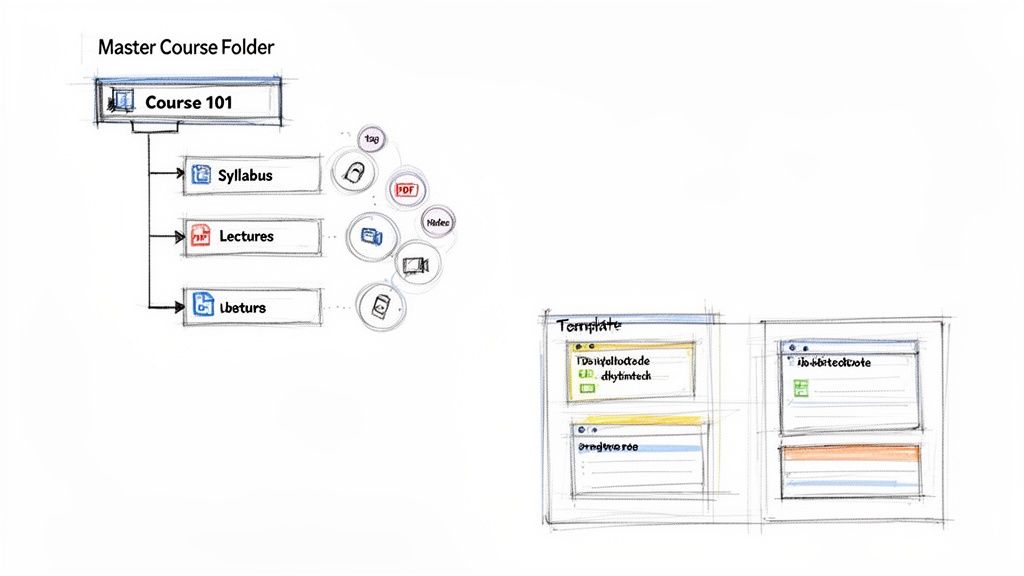
This kind of structure brings instant clarity. You should be able to glance at your setup and know exactly where everything for a specific class lives.
Your Semester-Proof Organization Playbook
A good system is simple enough that you'll actually stick with it. Forget about those complex, color-coded spreadsheets you've seen online. Here's a real-world workflow any student can use to get organized in under an hour.
Create One Master Folder Per Course: This is the most critical step. Make a main "workspace," "notebook," or "folder" for each class on your schedule (e.g., "PSYC 101," "CHEM 230"). This prevents your notes from bleeding into each other and keeps all related materials contained.
Organize by Week or Topic: Inside each course folder, create sub-folders. You can organize them by week ("Week 1," "Week 2") or by major topics from your syllabus ("Cellular Respiration," "The French Revolution"). Honestly, weekly folders are usually easier to keep up with during the semester's chaos.
Develop a Consistent Tagging System: Tags are your secret weapon for search. Think of them as keywords that connect ideas across different notes and weeks. A good tagging system will make finding information for your midterms an absolute breeze.
A tagging system is like creating your own personal search engine for your notes. Instead of just searching for words, you're searching for concepts you've already identified as important.
Start with a few simple but powerful tags:
#keyconcept: For the big ideas you absolutely have to know.#exam1: To group everything relevant for your first big test.#confusing: For topics you need to review or ask your professor about.#citation: To mark sources you need for a research paper.
Consistency is everything. Pick your tags and use them religiously.
Jumpstart Your Setup With AI
Look, manually creating this structure for five different classes can feel like a real chore. This is where AI-powered note taking software for students like Vivora completely changes the game. Instead of building from scratch, you can let AI do the heavy lifting.
With a tool like Vivora, you just dump all your initial course materials—the syllabus, lecture slides, and assigned readings—into one space. The AI gets to work immediately, analyzing the content and automatically building an organized study guide for you.
It's like having an assistant who sets up your entire semester's worth of folders and materials before you even begin. This is a massive time-saver, letting you skip the boring setup and get straight to learning. If you're looking for more ways to make your study sessions efficient, check out our guide on how to get started with AI-generated notes.
Whether you’re setting up your system manually or using AI, the principle is the same. Create a clear, consistent structure that lets your brain focus on understanding the material, not on hunting for it.
Turning Your Notes Into Better Grades
Let's be real—the whole point of this is to get better grades, not just to have a collection of pretty notes. A slick digital workspace is a great start, but it's time to connect that setup to actual results on your exams. This is where you shift from passively collecting information to actively learning and building a deep, lasting understanding of your coursework.
The magic happens when you stop being a digital hoarder and start engaging with your material. A simple weekly workflow is the best way to make this happen consistently, turning what feels like a mountain of content into knowledge you can actually use when it counts.
The Four-Step Weekly Study Loop
Instead of pulling a desperate all-nighter before a test, this repeatable cycle keeps you on top of everything. It’s designed to be quick and efficient, powered by the smart tools you’ve just put in place.
Capture and Consolidate: Right after class, while the lecture is still fresh in your mind, get all your materials into one spot. Upload the lecture slides, drop in any new PDFs, and add links to videos your professor mentioned. Just dump it all into your course workspace.
Process with AI: This is where you get a huge chunk of your time back. Let your note taking software for students do the heavy lifting. If you’re using a tool like Vivora, its AI automatically transforms your class content into a personalized study guide. You get instant summaries, flashcards, and quizzes from all your materials. This step takes minutes, not hours.
Review Actively: Now, don’t just re-read your notes. That's one of the least effective ways to study. Instead, use the quizzes the AI generated to test yourself. This is called active recall, and it's a scientifically proven method for locking information into your long-term memory. When you hit a question you can't answer, ask the AI chatbot to explain it in a different way.
Track and Adjust: Look at your quiz results. Where are you struggling? By spotting your weak points early each week, you know exactly what to focus on in your next study session. No more guessing what you don’t know—the data tells you straight up.
This simple workflow turns studying from a dreaded chore into a focused, productive habit.
This screenshot from Vivora’s dashboard shows you exactly how you can track your progress and pinpoint where you need to improve.
The visual progress bars give you an at-a-glance feel for your mastery level, making it obvious which topics need a little more love before the midterm.
Making Proven Study Methods Effortless
The best students rely on powerful learning techniques like active recall and spaced repetition (reviewing information at increasing intervals over time). The problem has always been that doing this stuff manually with paper flashcards is a massive pain to create and even harder to track.
AI-powered tools make these proven, science-backed study methods effortless. The software can automatically schedule which flashcards to show you and generate endless practice questions, so all you have to do is show up and learn.
This is the real game-changer with modern note taking software for students. It’s not just about organizing files; it’s about having a system that actively helps you learn smarter and faster. By automating the most effective study strategies, you're not just working harder—you're getting better results with less effort.
You can learn more about how to create custom tests with an AI quiz generator to really supercharge your study sessions. This approach transforms your notes from a static library of facts into a dynamic training ground for your brain.
Common Questions About Note Taking Apps
Got a few more questions? No problem. Picking the right note taking software for students can feel like a big decision, so let's tackle some of the most common things students ask.
Is Free Note Taking Software Good Enough?
Honestly, it really depends on what you need it for. Free apps like Google Keep or Apple Notes are fantastic for grabbing a quick grocery list or jotting down a random thought. But when you’re talking about a full semester's worth of classes, they usually don't cut it.
The biggest issue is they often lack the powerful organization, PDF annotation, and AI study tools that can save you a ton of time. Paid software, or tools with a really solid free tier like Vivora, are built from the ground up for how students actually study. They’re designed to help you turn a chaotic folder of class files into an actual, usable study guide—something the basic free tools just weren't made to do.
The real value isn't just in storing notes; it's about having a tool that actively helps you learn from them. Free apps are for reminders, but academic apps are for results.
How Can AI Actually Help Me Study Better?
Okay, let's get real for a second—AI isn't just a buzzword anymore. When it works right, it’s like having a personal study assistant who’s available 24/7. Instead of you spending hours re-reading your notes or manually making flashcards, an AI-powered tool can do the heavy lifting in seconds.
Here’s what that actually looks like:
It can transcribe audio from your lectures, so you can actually focus in class instead of typing like a maniac trying to catch every word.
It can summarize dense readings and pull out the key concepts you absolutely need to know.
It can auto-generate quizzes and flashcards based on all your course materials.
This frees you up to spend your time actually understanding the hard stuff instead of getting buried in busywork.
What Is The Best Way To Organize My Notes?
The best system is always the one you’ll actually stick with, so my advice is to keep it simple. A great starting point is to make a main folder (or notebook) for each class. Inside each of those, you can organize by week or by lecture topic.
Using tags is also a total game-changer. Something like #exam1 or #keyconcept makes finding specific info across all your notes lightning-fast when you're cramming for a midterm. Tools like Vivora make this even easier by letting you dump all your materials for a class into one space, automatically keeping them organized and ready for you to study.
Stop letting disorganized notes run your life. Vivora is the AI-powered study tool that turns your chaotic class materials into clear, personalized study guides. Upload your slides, PDFs, and lecture links, and get back summaries, flashcards, and quizzes in minutes.